
Steering Through an Endless City
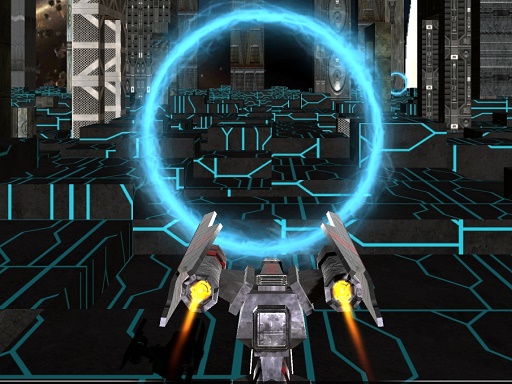
In Space Racer 2 Arcade Racing, your spaceship moves forward automatically, so the only input is left or right steering. On a keyboard, the arrow keys handle direction; on touchscreens, tapping the left or right side of the screen does the same. The cityscape scrolls continuously, and buildings appear in your path along with other obstacles. Because the ship never stops on its own, every run depends on how cleanly you read the upcoming layout and adjust your line.
Escalating Speed and Real-Time Obstacles
The environment is not a fixed track. Obstacles move in real time, and the game accelerates the longer you survive. That combination turns a simple two-button control scheme into a test of anticipation: the same gap that felt wide at the start of a run can close quickly once speed ramps up. A single collision ends the attempt, and your score is tied to distance covered, so the pressure comes from staying alive rather than from a timer or a finish line.
Credits, Skins, and Upgrades
Credits appear on the track during runs. Flying through them adds to your score and builds a currency you can spend in the in-game shop. The shop offers spaceship skins and upgrades, giving each run a second purpose beyond beating your previous distance. Because credits are collected mid-run, there is a small risk-reward decision: drifting toward a credit line can pull you closer to an obstacle, while ignoring credits slows your progress toward new cosmetics and improvements.
Designed for Quick, Family-Friendly Sessions
The bright, colorful graphics and simple design keep the experience accessible. There is no violent or inappropriate content, and the controls work on both keyboard and touch devices. Runs are short by nature, which suits players who want a pick-up-and-play arcade challenge rather than a long campaign. The endless format means there is no final level to clear; progress is measured by personal distance records and the upgrades you unlock over time.







Comments
0 comments